The short answer to “what is a nameserver” is this: it is the server that holds a domain’s authoritative DNS records and answers queries about it. Resolvers reach it by following delegation from the root zone through the TLD, such as .si. They then ask your nameservers for the website address, mail server or text record they need.
Most people meet nameservers at an awkward moment: right after buying a domain, moving it to a new registrar or switching DNS hosts. The switch is where outages happen. Email stops because nobody copied the MX records, or a leftover DNSSEC record makes validating resolvers return SERVFAIL for the whole domain. This guide covers how delegation works, a checklist that prevents both failures, and the delegation TTLs we measured for .com and .si on November 11, 2026.
What is a nameserver?
A nameserver (also written name server), or authoritative name server, is a DNS server that answers for a domain from its own copy of the zone. RFC 9499 defines an authoritative server as one that knows the content of a zone “from local knowledge.” It adds that such a server “is named in the NS (‘name server’) record in a zone.” Every domain lists its nameservers in NS records that its parent TLD publishes.
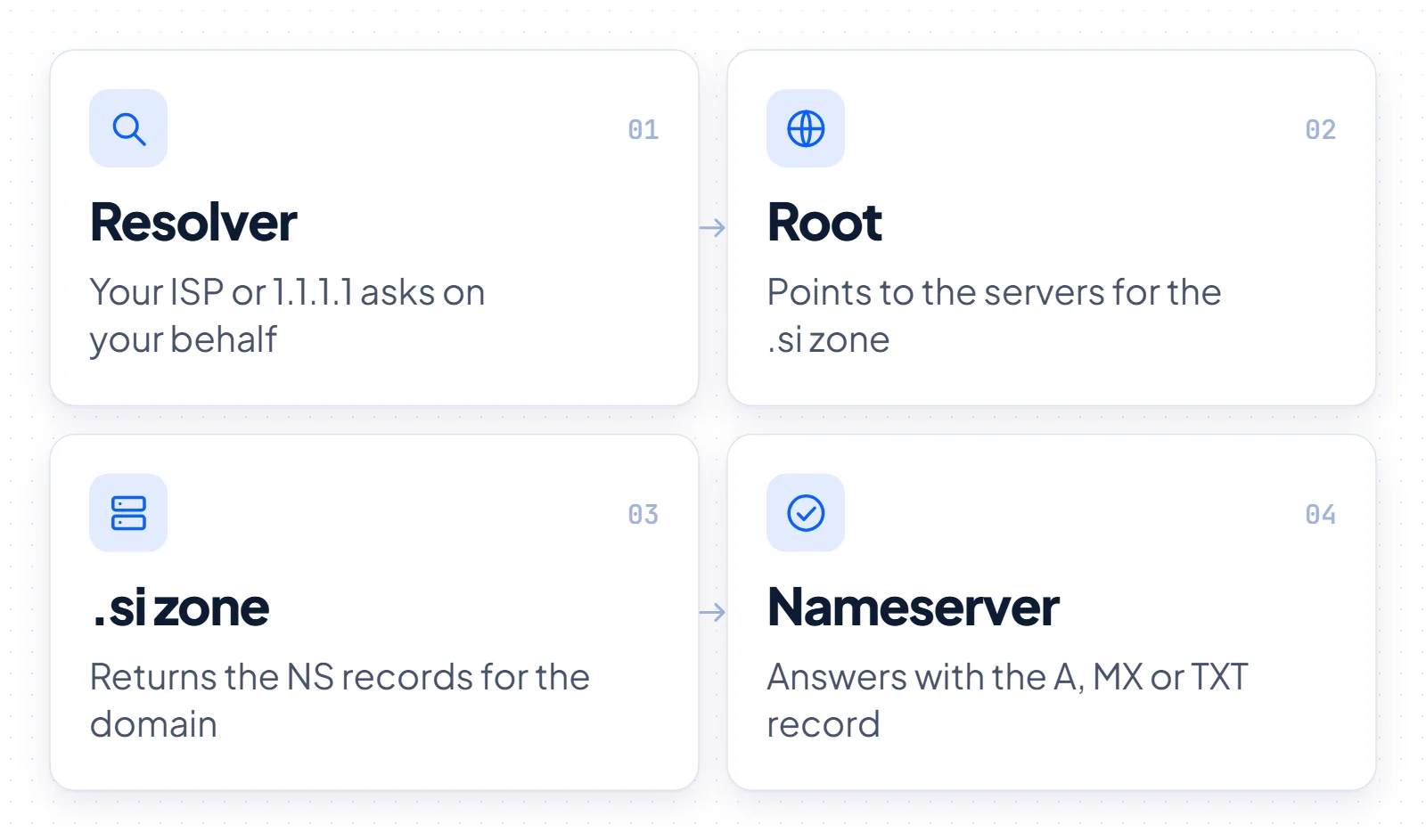
The other half of DNS is the recursive resolver, which RFC 9499 describes as “expected to cache the answers it receives.” Your ISP or a public service such as 1.1.1.1 runs one. The resolver asks on your behalf; the nameserver holds the answers.
Nameserver names usually reveal the DNS provider. Cloudflare assigns each zone two nameservers that follow the pattern <proper_name>.ns.cloudflare.com. Amazon Route 53 gives every hosted zone four nameservers, spread across awsdns hostnames under .com, .net, .org and .co.uk. Google Cloud DNS uses names such as ns-cloud-a1.googledomains.com, and Azure DNS spreads four servers across azure-dns.com, azure-dns.net, azure-dns.org and azure-dns.info.
How a DNS lookup reaches your nameservers
A lookup walks down the DNS tree by referral: each level knows who is responsible for the next one down. Take a visitor loading example.si. Their resolver first checks its cache. On a miss, it asks a root server, which replies with the nameservers for the .si zone. A .si server then returns the NS records for example.si, and one of those nameservers returns the actual A, MX or TXT record.
At the top of the tree sit 13 named root server identities, lettered A to M and run by 12 independent operators. According to root-servers.org, those identities ran on 2,048 operational instances as of November 11, 2026.
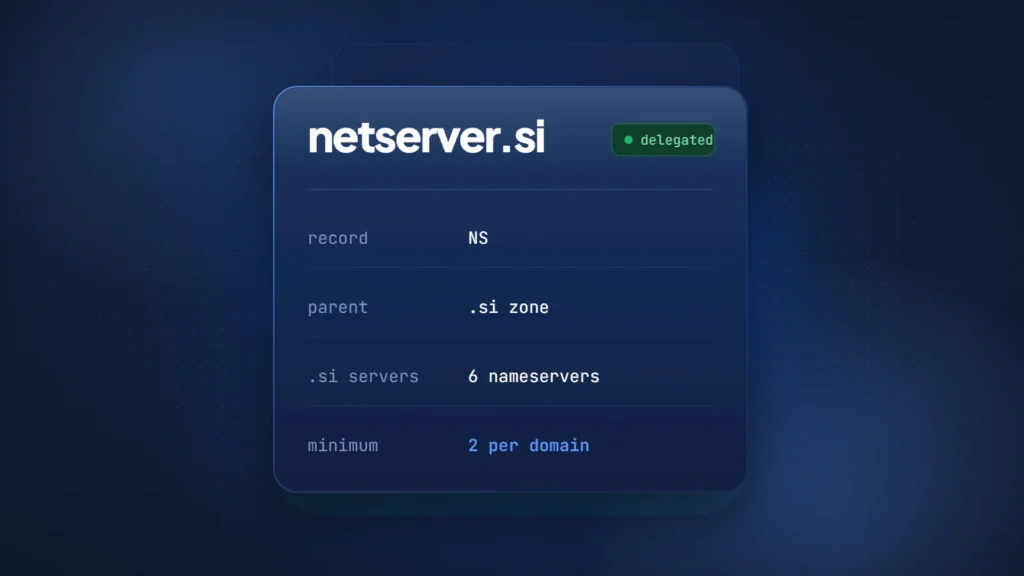
One level down, the IANA root zone database lists six nameservers for .si: b, f, h, i, k and l.dns.si, all reachable over IPv4 and IPv6. For comparison, .com publishes 13.
Delegation and glue
Each handoff is a delegation. RFC 9499 defines it as “the process by which a separate zone is created in the name space beneath the apex of a given domain.” The parent zone (.si) publishes NS records naming the servers for the child (example.si), and the child’s zone carries its own NS records at the top.
Glue solves a chicken-and-egg problem. If example.si uses ns1.example.si as a nameserver, a resolver cannot look up that hostname without first reaching example.si. So the parent also publishes the IP address of ns1.example.si. RFC 1034 calls these glue records and notes they are not part of the parent’s authoritative data.
Nameservers vs DNS records
Nameservers decide who answers for your domain; DNS records decide what the answer is. NS records sit in the parent zone and change at your registrar. A, MX and TXT records sit in the zone on your DNS host and change in that host’s dashboard. A nameserver switch hands the whole zone to a new host, so every record must exist there first.
| Nameservers (NS) | DNS records (A, MX, TXT…) | |
|---|---|---|
| What it decides | Which servers answer for the domain | What the answer is: website address, mail server, verification text |
| Where you edit it | At the registrar, which passes it to the registry | At the DNS host the nameservers point to |
| How many | At least 2 per domain | As many as your services need |
| What breaks if wrong | The whole domain: website, email and every other service | Only the service that record controls |
Many registrars also host DNS by default and show both in one dashboard. Once the nameservers point elsewhere, records left at the registrar answer for nothing. Our guide to what a domain registrar does explains where that boundary sits.
Primary and secondary name servers
Primary and secondary describe where a zone is maintained, not the order in which resolvers try servers. The primary is the source of the zone and is named in its SOA record; secondaries copy the zone from it. Resolvers choose among all listed nameservers, usually by response time, and do not prefer ns1 over ns2.
The labels ns1 and ns2 are only hostnames. Many large providers use anycast, so one nameserver name answers from many locations.
RFC 1034 states: “we require every zone to be available on at least two servers.” RFC 2182 (BCP 16, July 1997) goes further: “It is recommended that three servers be provided for most organisation level zones.” It adds that secondaries “must be placed at both topologically and geographically dispersed locations.”
Two nameservers on one network add little. If both resolve to the same IP address or share one upstream link, a single failure takes out both.
Who runs nameservers: 30 AI companies vs 28 Slovenian sites
Large AI companies concentrate their DNS on a few cloud providers, while most well-known Slovenian sites keep at least one nameserver under .si. We checked the NS records of both groups on November 11, 2026, using Google Public DNS over HTTPS.
BuySI Domains checked 30 well-known AI company domains on November 11, 2026. Of those, 28 used one of four large cloud DNS providers: Cloudflare (17), Amazon Route 53 (5), Google (5) and Microsoft Azure DNS (1, openai.com). The other two were databricks.com, which runs nameservers on its own domain, and one domain on GoDaddy DNS. Each domain lists either 2 nameservers (Cloudflare, GoDaddy) or 4, and none of the 30 uses a nameserver under .si.
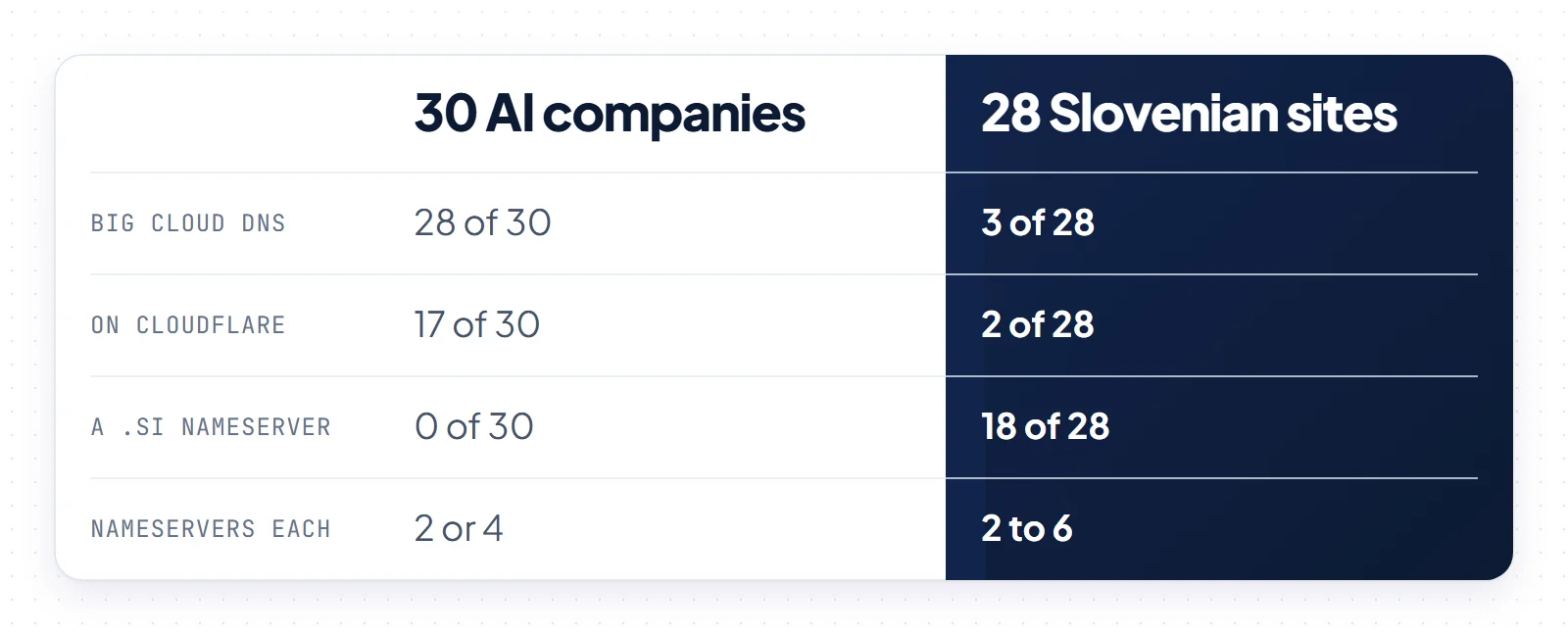
The Slovenian sample of 28 well-known websites in government, universities, banking, telecoms, media and retail looks different. Only 3 of the 28 use the big cloud DNS providers (2 Cloudflare, 1 Google Cloud DNS). For 18 of the 28, at least one nameserver hostname sits under .si. Every site lists at least 2 nameservers, the largest set has 6, and several mix their own servers with a Slovenian ISP, Arnes or an international secondary.
Read these as two redundancy models, not a ranking. Concentration means one provider and one set of failure modes behind several hostnames. The Slovenian mix spreads servers across operators, closer to the dispersal RFC 2182 describes, but more parties must coordinate a change.
How to change nameservers without downtime
A nameserver change is safe when the new DNS host already serves a complete copy of your zone and DNSSEC is out of the way before the switch.
- Copy every record from the current DNS host: A records, MX records, the SPF, DKIM and DMARC TXT records, and every verification TXT record for search, email or SaaS tools. Missing MX and TXT records are the usual reason mail breaks after a move; our guide to setting up a custom email domain lists what a mail setup depends on.
- Recreate the zone at the new host and compare it with the old one, record by record, before you touch the registrar.
- Lower the TTLs on records you may need to correct, well ahead of the switch, so caches let go quickly if something is wrong.
- Remove the DS record at the registrar or turn off DNSSEC, then wait for the old DS TTL to pass. Cloudflare’s DNSSEC documentation warns that if nameservers change before the old DS TTL expires, “validating resolvers will return SERVFAIL.”
- Change the nameservers at your registrar. Enter every nameserver the new host assigned, not just the first two.
- Verify the delegation with
dig NS example.siornslookup -type=NS example.si, then query the new servers directly for your MX and TXT records. - Re-enable DNSSEC at the new host and submit the new DS record through your registrar. Our explainer on how DNSSEC protects a domain covers the DS and DNSKEY pair.
The 48-hour myth
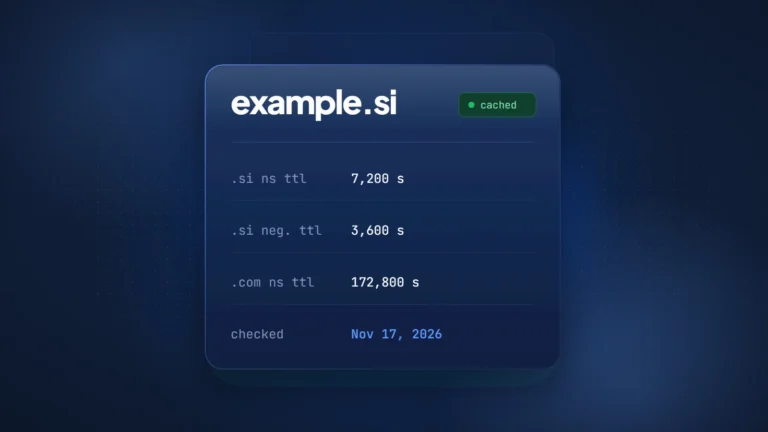
Nameserver changes do not take a fixed 48 hours. The real delay is how long resolvers may cache the old NS set. The parent zone’s delegation TTL sets the baseline, and your old zone’s NS TTL can add to it. In direct queries by BuySI Domains on November 11, 2026, the .com servers returned delegations with a TTL of 172,800 seconds (2 days), while the .si servers used 7,200 seconds (2 hours).
Google Cloud’s DNS documentation puts it plainly: “Resolvers could continue to use your old name servers until the TTL on the old NS records expire.” The registrar adds its own delay: Cloudflare tells customers to “wait up to 24 hours while your registrar updates your nameservers.” The familiar 48 hours matches the .com delegation TTL, so it describes caching at the .com parent, not a wait every change needs.
Nameservers for a .si domain
A .si domain needs at least two nameservers that pass Register.si’s Zonemaster tests before the registry will delegate it. .si is Slovenia’s country-code domain. For AI companies it reads as SuperIntelligence. The registry, Register.si, sets the nameserver rules; our guide to the .si domain covers registration itself.
The Register.si DNS check rules require at least two NS records in a delegation and advise against hosts that resolve to the same IP address. They also recommend placing nameservers in at least two topologically separate networks.
Before delegating, Register.si runs Zonemaster tests. The nameservers must answer over UDP and TCP on port 53, set the AA bit and match the glue. They must also serve the same NS and SOA records, list the same NS set as the delegation and refuse open recursion. If you submit a DS record, a matching DNSKEY must exist.
The registry is explicit about failures: with ERROR or CRITICAL in the report, the domain “will not be delegated to DNS.” The technical contact receives the report. After a nameserver change, Register.si checks the delegation every 10 minutes for the first 8 hours, then hourly up to 24 hours, then daily. Any nameserver change resets that schedule, so build and test the zone at the new host before you submit the change.
Changes go through a registrar only. Register.si’s General Terms, valid from November 15, 2024, state that “Only Registrars may submit applications to Registry on behalf of Domain name holders.” DNSSEC has been available for .si since December 1, 2011, so the DS step in the checklist applies to .si domains as well.
Because the NS set decides where a domain resolves, attackers target it. ICANN’s Security and Stability Advisory Committee warned in SAC044 (November 5, 2010) that malicious changes to name server configuration can send a domain to unintended IP addresses. It encouraged registry locks as a complement to registrar locks. Register.si applies a registry lock at the registrar’s request; our note on how domain hijacking happens covers the other defenses.
A name like netserver.si fits this layer of the internet: a hosting company or managed DNS service could run its own nameservers under it. BuySI Domains lists netserver.si for sale.
Which nameservers should you use?
Keep your registrar’s default nameservers if the domain is parked, redirects, or runs a small site with a handful of records. One account then holds both the registration and the DNS.
Move to a managed DNS provider when the domain carries a product or many records, or when its records change through an API. That is the setup 28 of the 30 AI companies in our check use.
Run your own nameservers, or mix them with a secondary from another operator, only if a network team will keep them patched and monitored. Follow RFC 2182: three servers in dispersed locations. For a .si domain, test the setup against Zonemaster before you ask the registrar to switch.
In every case, keep at least two nameservers on separate networks, ask your registrar about a lock, and update the DS record with every nameserver change.