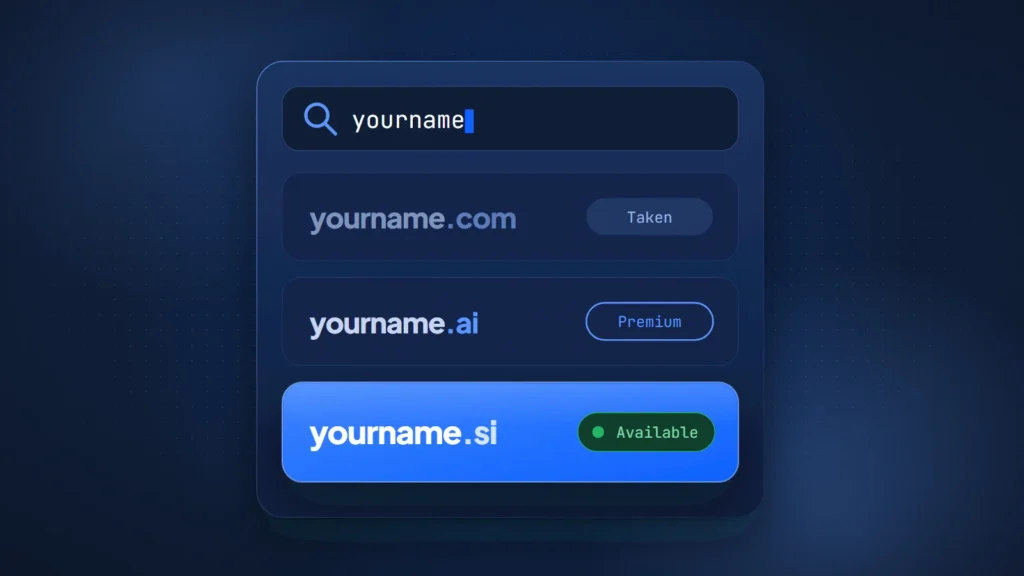
Here is how to check if a domain name is available: type it into a registrar’s search box, then confirm with an RDAP lookup at the registry. A “not found” result usually means nobody holds the name. Reserved, premium and soon-to-drop names can mislead you, so the registrar’s checkout is the final word.
The tools changed in 2025. On January 28, 2025, RDAP became ICANN’s definitive source for registration data in generic top-level domains. From that date, ICANN stopped requiring most gTLD registries and registrars to run WHOIS. Most guides still stop at the search box, though. They rarely explain what a result like “client hold” or “redemption period” means for you.
This guide walks through the four-step check and a table of what each result means. It then covers the .si rules and what we found when we looked up 80 short names across .com, .ai and .si.
How to check if a domain name is available in four steps
The reliable method has four steps: search, look up the registry record, read the status, and confirm at checkout. Each step answers a different question, and skipping one is how people end up chasing a name that was never free.
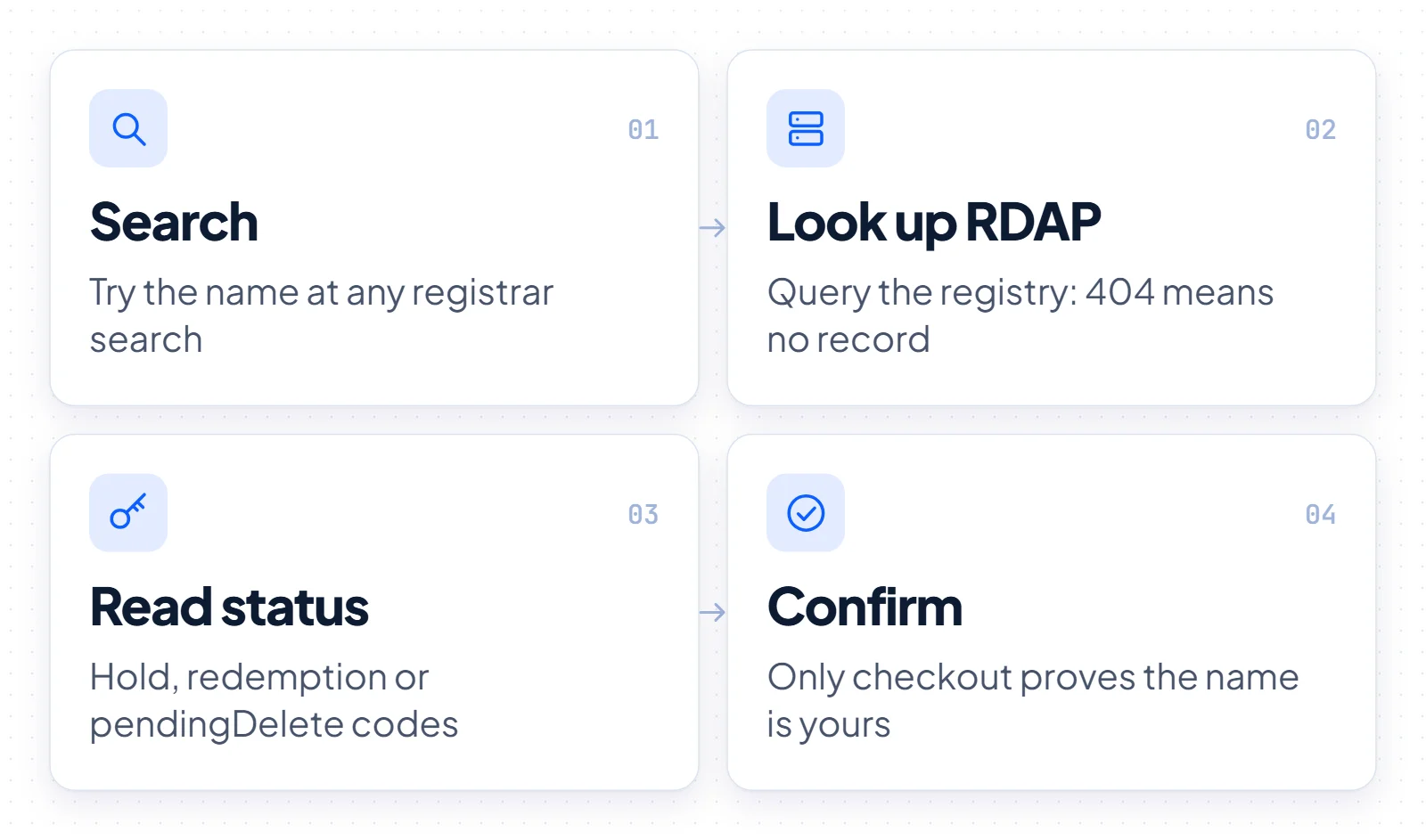
- Search at a registrar. A registrar’s search box tells you whether that store can sell you the name today, and at what price. Results often mix standard registrations with registry premium names and aftermarket listings, so note which kind of price you are looking at.
- Look up the RDAP record. Query the registry directly, for example with ICANN Lookup for generic TLDs. This shows whether a registration exists at all, independent of any store.
- Read the status. A registered name carries status codes and an expiry date. Together they tell you whether the name is in normal use, on hold or on its way to deletion.
- Confirm at checkout. Only the registrar’s order step proves you can register the name at the quoted price. Reserved and premium names often surface here, after the search looked clean.
A website that does not load says nothing about availability. Plenty of registered names are parked, unused or deliberately switched off in DNS. Before you search, build a shortlist rather than settling on one favorite. Our guide on how to choose a domain name covers that side of the work.
Use RDAP for the authoritative answer
RDAP, the Registration Data Access Protocol, is the standard way registries publish their record of a domain, delivered over HTTP as structured data. When the registry has the name, its server answers with HTTP 200 and the registration details. When it has no matching object, RFC 7480 says it returns HTTP 404, which lookup tools show as “not found”.
The protocol is an IETF standard. RFC 7480 defines the HTTP behavior, while RFC 9082, RFC 9083 and RFC 9224 cover the query format, the JSON responses and server discovery. Discovery matters in practice: IANA publishes a bootstrap file that maps each top-level domain to its RDAP server.
For generic TLDs such as .com, ICANN Lookup is the simplest front end. WHOIS has not vanished: ICANN’s RDAP FAQ lists .com, .name and .post as exceptions to the WHOIS sunset, and many country-code registries still run it. For gTLDs, though, RDAP is the record to trust.
Country-code domains work differently. Each ccTLD registry runs its own lookup, so for .si or .ai you query the server named in IANA’s bootstrap file or use the registry’s website. Expect most results to hide the owner. Our explainer on why WHOIS and RDAP records hide owner details covers the reasons.
What each lookup result and domain status code means
“Taken” covers several different situations, and only some of them mean the name may come free soon. RDAP shows status codes in readable form, such as “client hold” or “redemption period”. These match the camelCase EPP codes that ICANN documents on its status code page.
| Result or status | What it means | What you can do |
|---|---|---|
| RDAP 404 / “not found” | The registry has no registration on record. Usually the name is free, but reserved, blocked and premium names can also return 404. | Try to register it at a registrar and confirm the price at checkout. |
| Registered, status “active” or “ok” | The name is held and in normal use. “ok” is the standard status for a domain. | Pick another name or contact the holder about buying it. |
| “inactive” | The name is registered but has no name servers, so no site or email runs on it. | Treat it as taken. An unused name can still be for sale. |
| “client hold” or “server hold” | Registered, but the registrar (client) or registry (server) has told DNS not to activate it. | Treat it as taken and check the expiry date. A dark website is not a free name. |
| “redemption period” (gTLDs) | The registrar asked the registry to delete the name, usually after it expired. The holder has 30 days to restore it. | Watch it. Many names are restored during this window. |
| “pending delete” (gTLDs) | Redemption ended without a restore. ICANN says the name is purged five calendar days later. | Place a backorder if you want a chance at the release. |
| Quarantine (.si) | An unrenewed .si name, held for no longer than 30 days with its DNS pointers removed. | Wait. If nobody renews it, the name is deleted and registrable again. |
| Reserved or blocked | The registry withholds the string from registration. RDAP may show 404, and some registries, such as Register.si, answer 200 for names that cannot be registered. | Choose a different name. The registrar will refuse the order. |
| Registry premium | Unregistered, but the registry prices it above the standard fee. | Check the registration and renewal price before checkout. |
| Registered and listed for sale | The holder offers the name on the aftermarket. | Buy it from the holder, ideally through escrow. |
The gTLD timeline is worth knowing by heart. An expired name that the registrar deletes stays in redemption for 30 days, and ICANN says it is purged five calendar days after that period ends. Before deletion, registrars must also interrupt DNS for at least the last eight consecutive days in which the holder can still renew, or from the expiry date if the name is deleted sooner. That rule is one reason a site can go dark well before the name drops.
How to check a .si domain
To check a .si domain, query Register.si, the .si registry, through the search box on its website or through its RDAP server at rdap.register.si, which IANA’s bootstrap file lists for .si. As a ccTLD, .si sits outside ICANN’s gTLD rules. .si is Slovenia’s country-code domain. For AI companies it reads as SuperIntelligence.
An RDAP lookup takes the form rdap.register.si/domain/name.si. The registry’s RDAP documentation says a 200 means the name is registered or cannot be registered at this time, while 429 means you are rate limited and should wait. A 404 usually means the name is not registered, “but that doesn’t always mean that the domain name can be registered.” Anonymous users see no holder or technical contact data.
The registration rules are short. Register.si’s general terms, published November 15, 2024, define a holder as a natural or legal person and state no residency requirement. The registry handles applications first come, first served, and only registrars under contract with it may submit them. Names run from 2 to 63 characters, cannot start or end with a hyphen, and a few strings such as 112.si and 113.si are reserved.
Expiry works differently from gTLDs. An unrenewed .si name enters quarantine on its expiry date, and the general terms say quarantine may not last longer than 30 days. Websites and email stop working during that time. If nobody renews the name, the registry deletes it, and whoever applies first can register it again.
A registered .si name is not always out of reach, because some holders sell. For example, BuySI Domains lists mkr.si for sale at a fixed price shown on its page. For the wider registration and transfer picture, see our guide to .si domain rules.
What our RDAP check of 80 short names found
In BuySI Domains’ RDAP check of 80 random letter strings on October 26, 2026, all 40 four-letter strings were registered as .com, but only 5 of 40 were registered as .ai and 3 of 40 as .si. We drew the strings (40 three-letter, 40 four-letter) from a seeded random generator and queried each one as .com, .ai and .si. Every query went to the registry server listed in IANA’s bootstrap file, and every answer was either HTTP 200 or HTTP 404.
We counted HTTP 200 as registered and HTTP 404 as no object found. Three-letter strings were almost all taken: 40 of 40 as .com, 39 of 40 as .ai and 40 of 40 as .si.
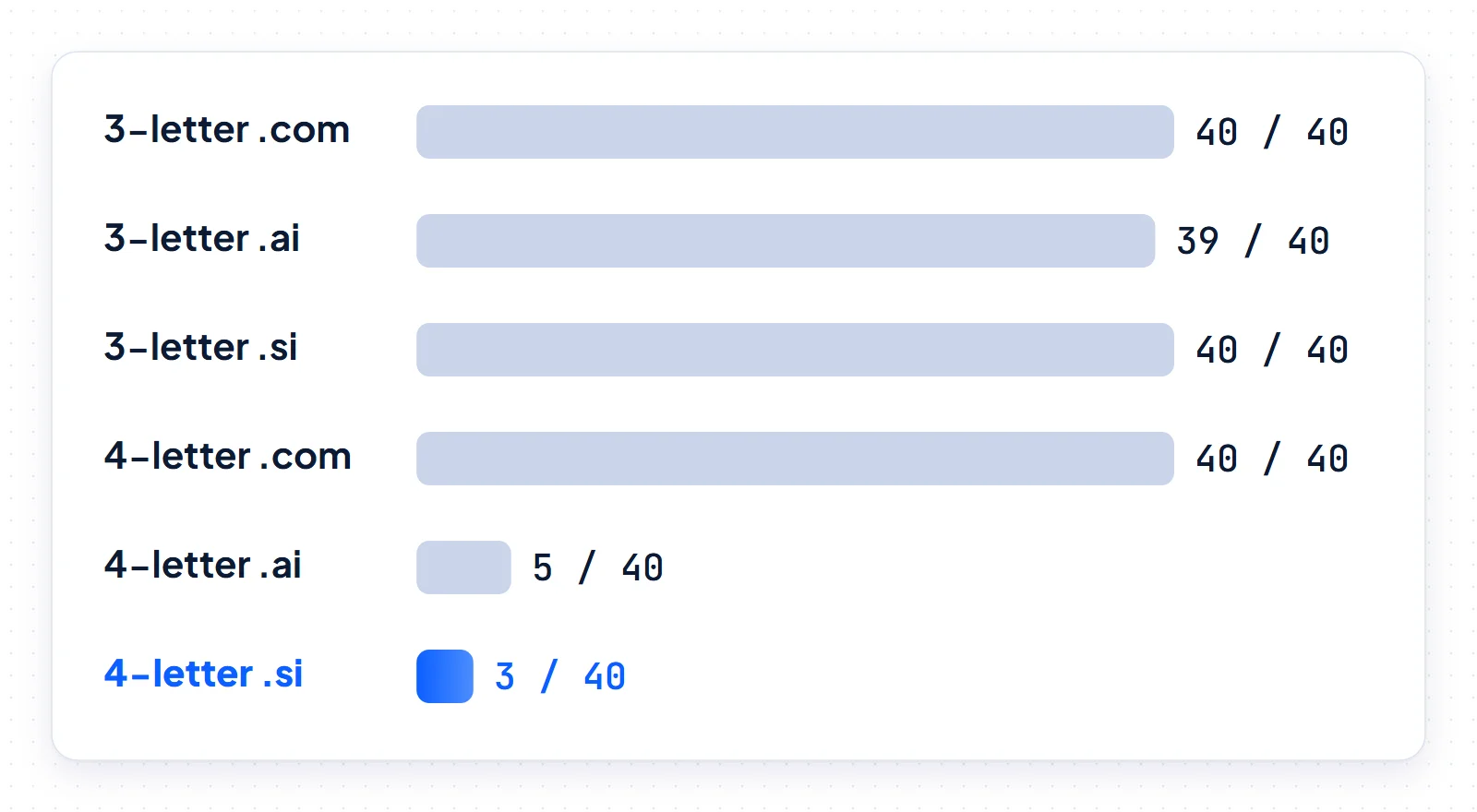
Across all 80 strings, we found 80 .com registrations, 44 .ai and 43 .si. A 404 means “not found”, not “confirmed registrable”, for the reasons Register.si itself gives. Treat these counts as a snapshot rather than a census. Forty strings per group from a single day is a small sample, so the shares carry wide margins.
The practical reading is still clear. In our sample, a random four-letter string was always registered as .com but usually had no record as .ai or .si. If a short name matters to you, check all three extensions in the same sitting.
What to do when the name is taken
A taken name leaves three paths: buy it from the holder, wait for it to drop, or change the name. The status you read in step three tells you which path is realistic.
If the name is active and not near expiry, buying it is the only way in. Anonymous RDAP rarely shows who the holder is, so contact goes through the registrar, a broker or an existing sale listing. Our guide to buying a domain that is already taken walks through that process. If the status shows redemption or pending delete, a domain backorder gives you a chance at the release.
Many people worry that searching for a name tips off someone who then registers it first. ICANN’s Security and Stability Advisory Committee said in SAC022 (2007) that checking the availability of a domain name can be a sensitive act. In its follow-up report SAC024 (2008), it reviewed 120 front-running claims and attributed about 74% to other activities. It found insufficient information to conclude that query services front-run names in any appreciable measure.
The defense is straightforward. Check at a reputable registrar or the registry’s own RDAP server, skip unknown lookup sites, and register promptly once you have decided.
Which check to trust, and when
Use a registrar search for speed while you brainstorm, and expect it to blend standard, premium and aftermarket results. Before you spend money or design work on a name, run the RDAP lookup at the registry and read both the status and the expiry date. For .si, use Register.si’s RDAP or search box, then register through a .si registrar. Treat any 404 as a starting point, not a guarantee.
Check the .com, .ai and .si versions together. Our sample shows how differently the same string can fare across extensions, and owning matching names is easier before a launch than after it. An available domain also does not make the name free to use as a brand, so search trademark databases and the social handles you need before you commit.
When every check comes back clean, buy the name the same day. Your registrar’s checkout is the step that turns “available” into yours.